An RRULE is the line in an iCalendar (.ics) event that stores a repeating pattern instead of every date, such as RRULE:FREQ=WEEKLY;BYDAY=MO,WE for "every Monday and Wednesday". A calendar app computes the dates from the rule each time it shows the event, so a weekly meeting that ran fifty times is still one event in the file. That is why a spreadsheet, a CRM import, or a simple converter often shows one row where there were fifty meetings.
This post explains how a recurring event is stored, what each part of the rule means, the rules that surprise people, and how to list the real dates. FindUtils tools used here: ICS Expand RRULE, ICS to CSV, ICS to JSON, and the Cron Expression Generator.
What makes an event recurring?
A recurring event is one VEVENT with a start time and a rule. The recurrence format is defined in RFC 5545, the iCalendar standard that Google Calendar, Apple Calendar, and Outlook exports use. Five properties work together:
| Property | Role | Example |
|---|---|---|
DTSTART | The first occurrence; every later one copies its time of day | DTSTART;TZID=Europe/Istanbul:20261005T093000 |
RRULE | The repeating pattern | RRULE:FREQ=WEEKLY;BYDAY=MO,WE;COUNT=8 |
RDATE | Extra dates added to the pattern | RDATE;TZID=Europe/Istanbul:20261024T093000 |
EXDATE | Dates removed from the pattern | EXDATE;TZID=Europe/Istanbul:20261014T093000 |
RECURRENCE-ID | Marks a separate VEVENT, with the same UID, that replaces one occurrence | RECURRENCE-ID;TZID=Europe/Istanbul:20261019T093000 |
RFC 5545 builds the final list, called the recurrence set, in a fixed order: take every start produced by RRULE and RDATE, then remove every start listed in EXDATE. Duplicates count once, and EXDATE always wins over the inclusion properties.
The parts of an RRULE
An RRULE is a list of NAME=VALUE parts separated by semicolons. Only FREQ is required; every other part narrows or expands the pattern. The parts below cover nearly every rule a calendar app writes.
| Part | Meaning | Notes from RFC 5545 |
|---|---|---|
FREQ | The base unit: DAILY, WEEKLY, MONTHLY, YEARLY (also HOURLY, MINUTELY, SECONDLY) | Required, and allowed only once |
INTERVAL | Repeat every n units | Defaults to 1; INTERVAL=2 with WEEKLY means every other week |
COUNT | Stop after n occurrences | DTSTART counts as the first one |
UNTIL | Stop at this date or time, inclusive | Never together with COUNT; in UTC when DTSTART has a time zone |
BYDAY | Days of the week, optionally numbered | 2TU is the second Tuesday, -1FR the last Friday; numbers only with MONTHLY or YEARLY |
BYMONTHDAY | Days of the month | -1 is the last day, -3 the third-to-last |
BYMONTH | Months of the year, 1 to 12 | BYMONTH=11 keeps November |
WKST | The day a week starts | Defaults to Monday; changes results for weekly rules with INTERVAL above 1 |
BYSETPOS | Picks the nth result inside each period | FREQ=MONTHLY;BYDAY=MO,TU,WE,TH,FR;BYSETPOS=-1 is the last weekday of the month |
RRULE examples with real dates
Reading a rule is easier with dates next to it. Each row below shows a rule, its start date, and the first occurrences it produces under RFC 5545.
| Pattern | Rule | DTSTART | First occurrences |
|---|---|---|---|
| Every other week on Tuesday and Thursday | FREQ=WEEKLY;INTERVAL=2;BYDAY=TU,TH | Tue 2026-10-20 | Oct 20, Oct 22, Nov 3, Nov 5, Nov 17, Nov 19 |
| Second Tuesday of every month | FREQ=MONTHLY;BYDAY=2TU | 2026-10-13 | Oct 13, Nov 10, Dec 8, 2027-01-12 |
| Last Friday of every month | FREQ=MONTHLY;BYDAY=-1FR | 2026-10-30 | Oct 30, Nov 27, Dec 25, 2027-01-29 |
| Last day of every month | FREQ=MONTHLY;BYMONTHDAY=-1 | 2026-07-31 | Jul 31, Aug 31, Sep 30, Oct 31, Nov 30, Dec 31 |
| Fourth Thursday of November | FREQ=YEARLY;BYMONTH=11;BYDAY=4TH | 2026-11-26 | 2026-11-26, 2027-11-25, 2028-11-23 |
To check a rule of your own, put it in an .ics file and drop it into ICS Expand RRULE, which writes every occurrence between two dates.
Surprise 1: a monthly event on the 31st skips months
A rule that repeats on the 31st does not move to the 30th in shorter months; it skips them. RFC 5545 says a recurrence that produces an invalid date, such as February 30, must be ignored and not counted.
So FREQ=MONTHLY with DTSTART on 2026-07-31 produces Jul 31, Aug 31, Oct 31, and Dec 31. September and November have no 31st, so they have no occurrence. The RFC's own example shows the same effect: FREQ=MONTHLY;BYMONTHDAY=15,30;COUNT=5 from 15 January 2007 gives January 15 and 30, February 15, and March 15 and 30.
The fix is to state what you mean. BYMONTHDAY=-1 is the last day of every month, whatever its length. The same rule explains why a yearly event that starts on 29 February appears only in leap years.
Surprise 2: EXDATE does not extend a COUNT
COUNT is applied while the rule is evaluated, and EXDATE is removed afterwards. A cancelled occurrence still uses up one of the counted slots.
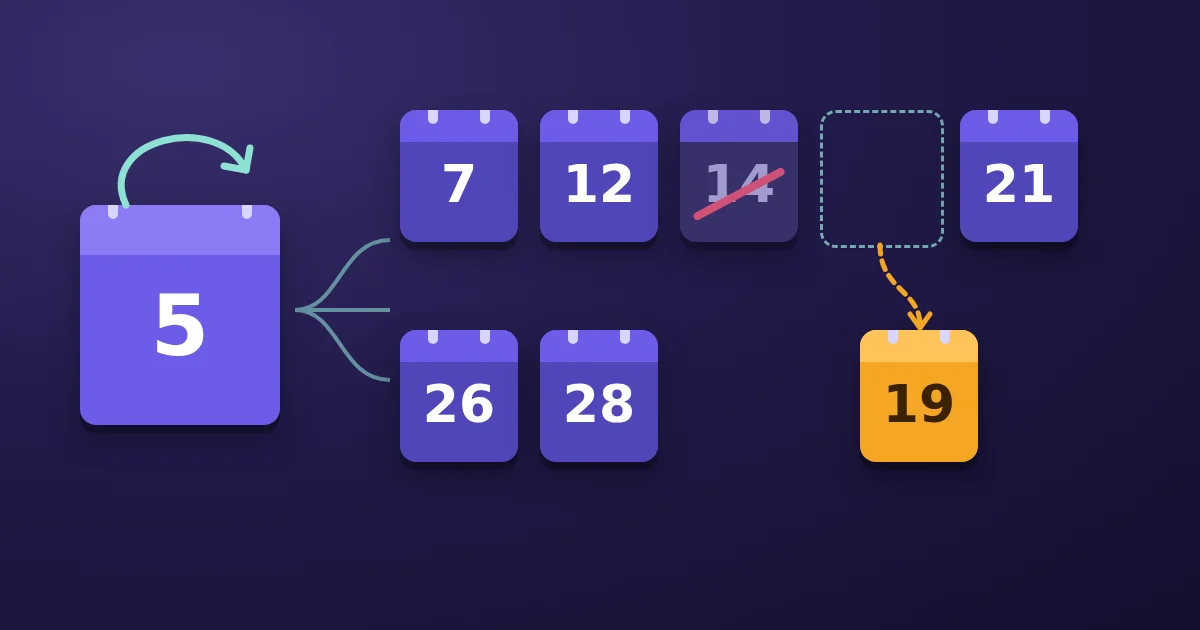
Take a standup with RRULE:FREQ=WEEKLY;BYDAY=MO,WE;COUNT=8 starting Monday 2026-10-05. The rule produces Oct 5, 7, 12, 14, 19, 21, 26, and 28. Add EXDATE for Oct 14 and seven meetings remain; the series still ends on Oct 28 rather than gaining an extra date in November. Use RDATE to add a make-up meeting.
Surprise 3: a moved meeting keeps its original ID
When one occurrence moves, the calendar does not edit the rule. It writes a second VEVENT with the same UID and a RECURRENCE-ID equal to the original start of that occurrence. RFC 5545 is explicit: if a Friday meeting moves to Thursday, the RECURRENCE-ID still holds the Friday.
A tool that ignores RECURRENCE-ID can list that meeting twice: once at the time the rule gives and once at the new time. ICS Expand RRULE replaces the original occurrence with the moved one, so the output lists the meeting once, at its new time.
Surprise 4: time zones and daylight saving time
A recurring event keeps its wall-clock time, not its UTC time. RFC 5545 recommends a DTSTART with a time zone reference (TZID) so that every occurrence starts at the same local time.
A weekly 09:00 meeting in America/New_York is 13:00 UTC on 26 October 2026 and 14:00 UTC on 2 November 2026, because daylight saving time ends in the United States on 1 November 2026. The local time stays 09:00 throughout. A time without TZID and without a trailing Z is "floating": it means 09:00 wherever the attendee is.
Two practical rules follow. When DTSTART has a TZID, the RFC requires UNTIL to be written in UTC. And when you need the same meetings in another zone, convert the whole file with ICS Timezone Convert rather than editing times by hand.
Surprise 5: WKST changes results
WKST sets the first day of the week, and it matters when a weekly rule has an INTERVAL above 1 and several BYDAY values. RFC 5545 gives this example, starting Tuesday 5 August 1997:
FREQ=WEEKLY;INTERVAL=2;COUNT=4;BYDAY=TU,SU;WKST=MOgives August 5, 10, 19, and 24.- The same rule with
WKST=SUgives August 5, 17, 19, and 31.
The difference comes from which Sunday belongs to the "every other" week. If your calendar shows a fortnightly event on unexpected Sundays, check WKST first.
RRULE vs cron: which one describes your schedule?
Both describe repeating times, but they solve different problems. Cron schedules jobs on one machine; RRULE describes events people attend, with a start, an end, and exceptions.
| Aspect | iCalendar RRULE | Cron expression |
|---|---|---|
| Defined in | RFC 5545 | POSIX crontab and its variants |
| Start and end | DTSTART, plus COUNT or UNTIL | None; runs until removed |
| "Last Friday of the month" | BYDAY=-1FR | Not in POSIX cron; some implementations add their own syntax |
| Every other week | INTERVAL=2 | No direct field |
| Time zone | Per event, with TZID | Not part of the POSIX format; each scheduler has its own setting |
| Exceptions | EXDATE, RDATE, RECURRENCE-ID | None |
| Day-of-month and day-of-week together | Both must match | Either may match (POSIX) |
The last row trips people up. The POSIX crontab specification says that when both the day-of-month and day-of-week fields are restricted, a day matching either one runs the job. In an RRULE, FREQ=MONTHLY;BYDAY=FR;BYMONTHDAY=13 means only Fridays that fall on the 13th. Build and check cron schedules in the Cron Expression Generator.
How to see every occurrence of a recurring event
Expanding a rule turns one recurring event into one event per date. On the ICS Expand RRULE page, the calendar is read in your browser and nothing is uploaded.
Step 1Export the calendar
Export the calendar as an .ics file. In Google Calendar, use Settings, then Import & export, then Export; in Apple Calendar, File, then Export; in Outlook, File, then Save Calendar.
Step 2Drop the file and set the window
Drop the .ics file on the page and set From and To. A rule without COUNT or UNTIL repeats forever, so the window decides which occurrences are written. Each series stops at a cap of 366 occurrences by default, adjustable up to 2000.
Step 3Read the notes
The notes name every series that was cut at the cap, every monthly series that skips short months, and every rule part the page does not expand. It expands DAILY, WEEKLY, MONTHLY, and YEARLY rules with INTERVAL, COUNT, UNTIL, BYDAY (including ordinals), BYMONTHDAY, BYMONTH, and WKST, plus EXDATE, RDATE, and RECURRENCE-ID. A rule that uses BYSETPOS, BYYEARDAY, BYWEEKNO, BYHOUR, BYMINUTE, BYSECOND, or an hourly or finer frequency keeps its first occurrence only.
Step 4Download the format you need
Choose .ics to import into another calendar, JSON for a script, or CSV for a spreadsheet. Each occurrence gets its own UID, so import the expanded .ics into a new, separate calendar; importing it next to the original series creates a second copy of every meeting.
If you only need the rule as text, ICS to CSV and ICS to JSON keep one row or object per event with the RRULE in its own field. To keep only some events before expanding, use ICS Filter.
FAQ
What does RRULE stand for?
RRULE is the "recurrence rule" property of the iCalendar format, defined in RFC 5545. Its value lists the frequency and the parts that pick dates, such as FREQ=MONTHLY;BYDAY=2TU.
Does DTSTART count as an occurrence?
Yes. RFC 5545 says the DTSTART value always counts as the first occurrence, including toward COUNT. A rule with COUNT=10 produces ten dates in total, the start included.
How do I make an event repeat on the last day of every month?
Use FREQ=MONTHLY;BYMONTHDAY=-1. A rule that repeats on the 31st skips months with fewer days, because RFC 5545 ignores invalid dates instead of moving them.
What is the difference between EXDATE and RECURRENCE-ID?
EXDATE removes an occurrence from the series. RECURRENCE-ID belongs to a separate event with the same UID and replaces one occurrence with new details, such as a different time or room.
Can I use COUNT and UNTIL together?
No. RFC 5545 allows either COUNT or UNTIL in one rule, not both. Without either, the rule repeats forever.
Is ICS Expand RRULE free, and is my calendar uploaded?
It is free and needs no signup. On the tool page the .ics file is read and expanded in your browser, and the calendar text is not uploaded.
Tools used in this post
- ICS Expand RRULE — turn recurring events into one event per occurrence between two dates
- ICS to CSV — one spreadsheet row per event, with the rule kept as text
- ICS to JSON — one JSON object per event for scripts
- ICS Filter — keep only the events you need by date, keyword, category, or status
- ICS Timezone Convert — move a calendar's events to another time zone
- Cron Expression Generator — build cron schedules and see the next run times
- ICS to CSV guide — the spreadsheet columns explained
- Cron Expression Generator guide — how five-field cron schedules work
- CSV to ICS guide — turn a spreadsheet of events into a calendar file
Sources
- RFC 5545: Internet Calendaring and Scheduling Core Object Specification (iCalendar), sections 3.3.10 (Recurrence Rule), 3.8.4.4 (Recurrence ID), 3.8.5.1 (Exception Date-Times), 3.8.5.2 (Recurrence Date-Times), and 3.8.5.3 (RRULE)
- The Open Group Base Specifications: crontab