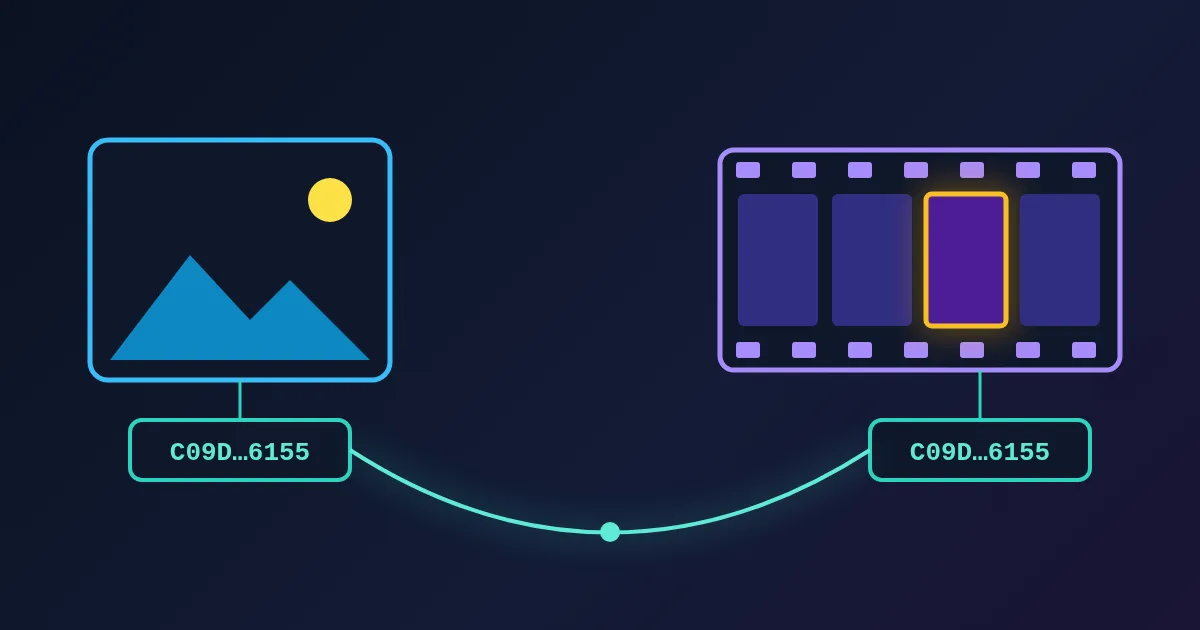
A Live Photo is two ordinary files: a still photo (HEIC or JPEG) and a short QuickTime movie (MOV) of about three seconds with sound. What makes them one Live Photo is a shared identifier. The same UUID-style string is written into the photo's Apple maker note (tag 0x0011) and into the movie's metadata under the key com.apple.quicktime.content.identifier. The movie also has a small timed metadata track, com.apple.quicktime.still-image-time, that marks which moment of the clip is the still. When Photos finds a photo and a movie with the same identifier, it shows them as one item that moves when you press it.
That design explains most Live Photo problems: why a .livp file is "just a ZIP", why an edited copy stops moving, and why sending one to Android gives you a plain photo. This post walks through each part.
What the Camera Records
Apple's support page says that with Live Photos, the iPhone "records what happens 1.5 seconds before and after you take a picture", and its iPhone guide adds that this includes the audio. Live Photo is on by default in Photo mode. In Photos you can later pick a different key photo from the clip, or apply the Loop, Bounce and Long Exposure effects.
So one tap produces:
| Part | Format | Holds |
|---|---|---|
| Key photo | HEIC (or JPEG) | The full-resolution still and its EXIF data |
| Paired video | QuickTime MOV | About 3 seconds of video and sound around the shot |
In Apple's PhotoKit, the movie is a separate resource of the same asset. Its type is PHAssetResourceType.pairedVideo, described as "the original video data component of a Live Photo asset".
The Three Pieces of Metadata That Make the Pair
1. The identifier in the photo. The still stores the ID in Apple's maker note, a block of camera-specific data inside EXIF. ExifTool's Apple tag table lists tag 0x0011 as ContentIdentifier. In Apple's Image I/O framework this block is the kCGImagePropertyMakerAppleDictionary, and code that creates Live Photos writes the ID under the key "17" (0x11 in decimal).
2. The identifier in the movie. The MOV stores the same string as QuickTime metadata. Apple's AVFoundation names it quickTimeMetadataContentIdentifier; the raw key is com.apple.quicktime.content.identifier (ExifTool's QuickTime tags also read it as ContentIdentifier).
3. The still-image time. The MOV has a timed metadata track with the key com.apple.quicktime.still-image-time. Its value is always -1; what matters is when the sample sits on the timeline, because that time is the frame the key photo matches. ExifTool's QuickTime table notes exactly this: the tag "always has a value of -1" and the time of the still comes from the sample's time.
You can see the pair with ExifTool:
exiftool -ContentIdentifier IMG_0001.HEIC IMG_0001.MOV
If both lines show the same value, the two files belong together. If one is missing, Photos has nothing to match, and you have a photo and a video, not a Live Photo.
Why the Pair Is Fragile
Apps rebuild a Live Photo from files with the request(withResourceFileURLs:…) method of PHLivePhoto. Apple's documentation for it says that Photos "validates that the files and their metadata can be loaded as a Live Photo", and that it can load one "only from the same set of files exported from a previously captured Live Photo asset". Three common ways to lose the pair:
- Re-encoding the photo in an editor or converter that drops the maker note. The pixels survive; the identifier does not.
- Re-encoding or trimming the movie with a tool that drops QuickTime metadata or the still-image-time track.
- Separating the files. Many upload forms, chat apps and email keep only the photo. Apple notes that a Live Photo shared through Mail "is sent as a still image".
Apple also warns that editing a Live Photo in a third-party app can lose its Live Photo effects.
What a .livp File Is
When a Live Photo leaves Apple's apps, the two files have to travel somehow. One way is a .livp file: a ZIP archive holding the HEIC and the MOV side by side, with their names (IMG_0001.HEIC, IMG_0001.MOV). There is no new codec and no special container. Rename it to .zip and any archive program opens it.
The trouble is only on the receiving side. Windows and Android do not know the .livp extension, and many Windows installs still cannot show HEIC. The FindUtils LIVP Extract tool unpacks the ZIP in your browser, hands back the HEIC and MOV as they were stored, and can add a JPG copy of the still. Our LIVP Extract guide covers the steps and the edge cases.
How Android Motion Photos Differ
Android solves the same problem in one file. Google's Motion Photo format 1.0 defines a still image (JPEG, HEIC or AVIF) "with a secondary video file appended to it". XMP metadata in the image says it is a Motion Photo (Camera:MotionPhoto = 1) and gives the length of the video, so a reader can jump from the end of the file back to the start of the video. For HEIC and AVIF, the video sits in an mpvd box after the image. The spec suggests file names ending in MP, such as PXL_20261027_120000000.MP.jpg.
| Apple Live Photo | Android Motion Photo | |
|---|---|---|
| Files | Two: photo + MOV | One: photo with the video appended |
| Link | Same content identifier in both files | XMP directory with the video's byte length |
| Still frame in the clip | Timed still-image-time metadata track | Camera:MotionPhotoPresentationTimestampUs (or the middle of the clip) |
| What survives a careless copy | The photo, usually | The photo; the spec warns MotionPhoto = 1 can stay after the video is cut off, so readers "must always confirm that a video is present" |
| Opening it elsewhere | Unzip a .livp, or get two files | Any image viewer shows the still; the video needs a reader that follows the XMP |
Neither format turns into the other by renaming. Converting between them means extracting the clip and writing new metadata.
Showing Live Photos on the Web
Apple ships LivePhotosKit JS (announced in April 2017) for playing a Live Photo in a web page. You give it the still and the movie as two URLs, either with data-live-photo, data-photo-src and data-video-src attributes on an element, or through its JavaScript Player object. An optional data-photo-time tells the player where the still sits in the clip. Since browsers outside Safari often cannot show HEIC, serve a JPEG still, and since some cannot play every MOV, an MP4 copy of the clip is the safer choice. The Video Format Converter can change the container, and our post on containers and codecs explains why that is sometimes not enough.
A Checklist for Apps That Accept Photos
If your web or mobile app lets iPhone users upload photos, decide on purpose what happens to Live Photos:
- Do you want motion at all? If not, take the still and say so. That is what Mail does.
- If you do, store both files, and keep the pair together under one record.
- Keep the metadata you need to rebuild the Live Photo later: the maker note in the photo, and the QuickTime metadata and timed track in the movie. A pipeline that resizes or re-encodes everything will drop them.
- Strip location separately. Both files can carry GPS data; ExifTool's QuickTime table lists a
location.ISO6709key for movies. Removing location without touching the identifier needs a tool that edits tags instead of re-encoding. - Plan the playback. A JPEG still and an MP4 clip play almost everywhere; HEIC and MOV do not.
For a single file you just received, the HEIC to JPG converter handles a lone .heic, and the EXIF Remover removes metadata from JPEG, PNG and WebP copies before you post them.
Need help with a project? The team behind FindUtils takes on freelance work through Upwork, including a React Native app for iOS and Android connected to your web app.
FAQ
Is a Live Photo a video or a photo?
Both. It is a normal still photo and a short MOV video with sound, linked by a shared identifier in their metadata. Photos shows the still and plays the clip when you press it.
How long is a Live Photo?
About three seconds. Apple says the iPhone records 1.5 seconds before and 1.5 seconds after you take the picture.
Why did my Live Photo stop moving after I edited it?
The editor probably saved a new photo without the Apple maker note, or saved only the photo. Without the matching identifier, Photos cannot link the still to its clip.
What is the difference between a .livp file and a Live Photo?
A .livp is one way to carry a Live Photo outside Apple's apps: a ZIP with the HEIC and the MOV inside. The Live Photo itself is those two files plus their metadata.
Can Android show an iPhone Live Photo?
Usually only the still. Android's Motion Photo format puts the video inside the image file, so an iPhone's separate MOV is not played as motion unless an app handles it.
Related Reading
Sources
- Apple Support: Take and edit Live Photos
- Apple Support: Take Live Photos with your iPhone camera
- Apple Developer: PHAssetResourceType.pairedVideo
- Apple Developer: PHLivePhoto (the
request(withResourceFileURLs:placeholderImage:targetSize:contentMode:resultHandler:)method) - Apple Developer: quickTimeMetadataContentIdentifier and kCGImagePropertyMakerAppleDictionary
- Limit Point: Working with Live Photos (writing the identifier under key "17")
- ExifTool: Apple tags and QuickTime tags
- Android Developers: Motion Photo format 1.0
- Apple Developer: LivePhotosKit JS