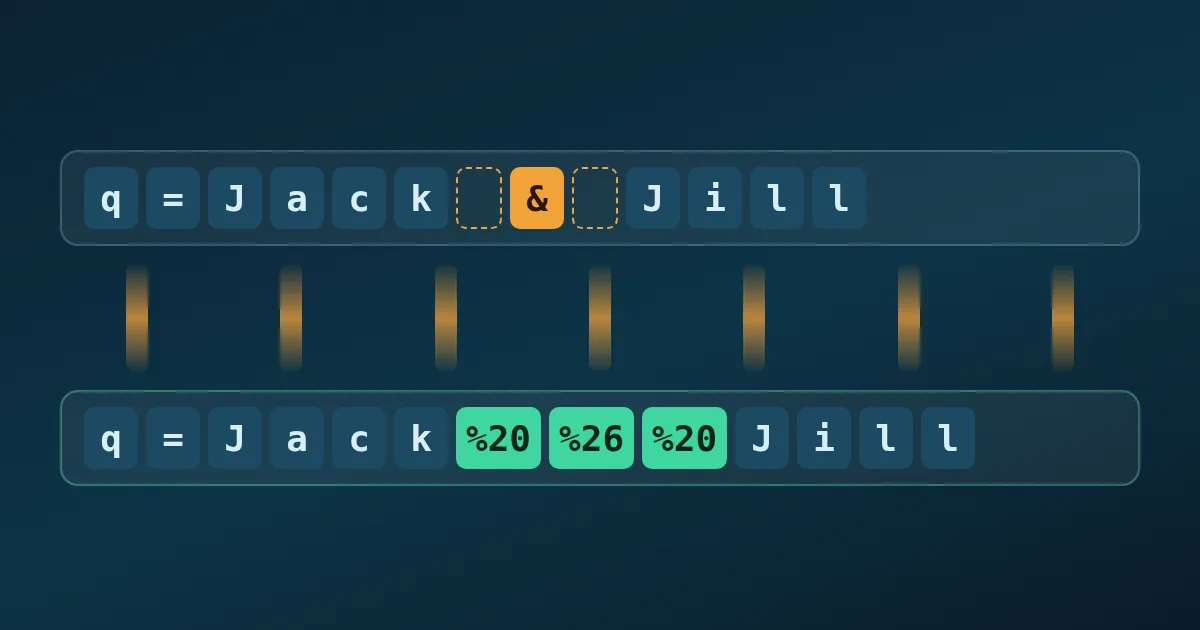
URL encoding, also called percent-encoding, replaces a character that is unsafe or has a special meaning in a URL with a % sign followed by two hexadecimal digits for each of its bytes. A space becomes %20, an ampersand becomes %26, and é becomes %C3%A9. Encoding is what lets a value such as Jack & Jill travel inside a query string without being read as two separate parameters.
This post explains which characters need encoding, why spaces appear as %20 in some URLs and + in others, and how to debug the most common broken-link cases. FindUtils tools used here: the URL Encoder Decoder, the URL Parser, JSON to URL Params, and the URL Slug Generator.
Which characters must be percent-encoded?
Percent-encoding is defined in RFC 3986, the generic URI syntax. The RFC sorts characters into two groups, and the group decides whether a character can appear as-is.
| Group | Characters | Rule |
|---|---|---|
| Unreserved | A–Z a–z 0–9 - . _ ~ | Never need encoding; producers should not encode them |
| Reserved: general delimiters | : / ? # [ ] @ | Separate the parts of a URL; encode them when they are data |
| Reserved: sub-delimiters | ! $ & ' ( ) * + , ; = | Separate values inside a part; encode them when they are data |
| Everything else | Spaces, quotes, %, <, >, non-ASCII letters, emoji | Always encode |
Non-ASCII text is first converted to UTF-8 bytes, and each byte is encoded on its own. That is why one emoji such as 😀 becomes four triplets, %F0%9F%98%80.
Why is a space sometimes %20 and sometimes +?
Two encodings exist side by side. RFC 3986 percent-encoding writes a space as %20. HTML forms use the application/x-www-form-urlencoded format, defined in the WHATWG URL Standard, which writes a space as +.
The difference matters when you decode. In JavaScript, decodeURIComponent() does not turn + into a space, so a+b%20c decodes to a+b c. MDN's decodeURIComponent() reference notes that query parameters need + replaced with spaces first. URLSearchParams does the opposite: per MDN's URLSearchParams reference, it reads + as a space and writes spaces as +.
The practical rule: a literal plus sign inside a value must be sent as %2B. Base64 strings, phone numbers in international format, and math expressions are the usual victims. MDN shows a Base64 value E+AXQB+A turning into E AXQB A after a round trip through URLSearchParams.
encodeURI vs encodeURIComponent
JavaScript has two encoding functions, and choosing the wrong one is a classic bug. encodeURIComponent() encodes everything except A–Z a–z 0–9 - _ . ! ~ * ' ( ), including / ? & = #, so it is the right choice for a single value. encodeURI() leaves the URL's structural characters alone, so it suits a whole URL that only needs spaces and non-ASCII letters fixed.
| Input | encodeURIComponent | encodeURI |
|---|---|---|
hello world & café? | hello%20world%20%26%20caf%C3%A9%3F | — |
https://example.com/a b?q=x&y=é | — | https://example.com/a%20b?q=x&y=%C3%A9 |
The FindUtils URL Encoder Decoder encodes with encodeURIComponent(), so it treats your input as a value: ?, &, =, and / are all encoded. Paste only the value you want to embed, not the full URL. MDN's encodeURIComponent() reference also notes that RFC 3986 reserves !, ', (, ), and *, which this function leaves unencoded.
How to debug a broken URL step by step
Most broken links fail in one of five ways. Work through them in order; each check takes seconds.
Step 1Split the URL into its parts
Paste the URL into the URL Parser. It shows the protocol, host, port, path, query string, and hash, and lists every query parameter in a key and value table with the values decoded. A parameter that is missing or cut short in the table points straight at the problem. Repeated keys, such as size=42&size=43, appear as one row per value and as an array in the JSON output.
Step 2Look for an unencoded & or # inside a value
If a value contains a raw &, everything after it becomes a new parameter. If it contains a raw #, everything after it becomes the fragment, which browsers do not send to the server. Encode the value on its own with the URL Encoder Decoder: & becomes %26 and # becomes %23.
Step 3Check for double encoding
A value that contains %25 followed by two hex digits, such as %2520, was encoded twice: %25 is the encoded form of % itself. Decode it once in the URL Encoder Decoder; if the result still contains %20-style triplets, decode again and then find the step in your code that encodes an already-encoded string.
Step 4Watch for malformed percent signs
A % that is not followed by two hex digits, such as 100%, cannot be decoded. The decoder reports invalid input in that case, which is the signal to encode the literal percent sign as %25.
Step 5Rebuild the query string from data
When a query string has many parameters, build it from a JSON object instead of by hand. JSON to URL Params encodes each value with encodeURIComponent() by default and writes arrays either as repeated keys (tags=a&tags=b) or with brackets (tags[]=a&tags[]=b). It also converts in the other direction, from a query string or full URL back to JSON.
What about non-ASCII domain names?
Domain names are not percent-encoded. Browsers convert an internationalized host name to an ASCII form starting with xn--, while the path and query are percent-encoded as UTF-8. Following the WHATWG URL Standard, https://münchen.de/straße becomes https://xn--mnchen-3ya.de/stra%C3%9Fe. The URL Parser shows the converted host, which helps when a log entry and a link do not seem to match.
Encoding is not the same as a clean URL
Percent-encoding makes any text safe inside a URL, but it does not make it readable. For page addresses that people see and share, a slug made of lowercase ASCII words and hyphens is easier to read and type. The URL Slug Generator turns a title such as Café Menu: Spring 2026 into cafe-menu-spring-2026, transliterating accented letters instead of encoding them.
Common mistakes
Mistake 1: Encoding the whole URL with a component encoder
Running a full URL through encodeURIComponent() encodes :// and every /, producing a string that no longer works as a link. Encode each value, then assemble the URL.
Mistake 2: Sending a literal + unencoded
Servers that parse form-style query strings read + as a space. Encode a plus sign in data as %2B.
Mistake 3: Decoding twice on the server
If a framework already decoded the query, decoding it again turns a legitimate %25 back into % and can corrupt values. Decode exactly once.
Mistake 4: Putting secrets in a URL
Encoding is not encryption; anyone can decode a URL. URLs also end up in browser history and server logs, so keep tokens and passwords out of query strings where possible.
FAQ
What does %20 mean in a URL?
%20 is the percent-encoded form of a space character. The 20 is the hexadecimal value of the space in ASCII and UTF-8.
Should I use %20 or + for spaces?
Use %20 in paths and in general URLs. + means a space only in form-encoded query strings. %20 is understood in both places, which makes it the safer choice when you encode by hand.
Why does my URL contain %2520?
The URL was encoded twice. %25 is an encoded percent sign, so %2520 decodes to %20, which decodes to a space. Remove the extra encoding step.
Does the URL Encoder Decoder upload my data?
No. On the tool page, encoding and decoding run in your browser and the input is not sent to a server.
Is URL encoding the same as Base64?
No. Percent-encoding escapes individual characters so that text fits in a URL, while Base64 re-encodes binary data as text. A Base64 value can itself contain +, /, and =, so it still needs percent-encoding inside a query string. The Base64 Encoder handles the Base64 step.
Is the fragment after # sent to the server?
No. The part after # stays in the browser. The URL Parser shows it so you can see what an anchor link or a client-side router will use.
Tools used in this post
- URL Encoder Decoder — percent-encode a value or decode an encoded string
- URL Parser — split a URL into parts and list decoded query parameters
- JSON to URL Params — build a query string from JSON, or turn one back into JSON
- URL Slug Generator — create readable, transliterated slugs from titles
- Base64 Encoder — encode and decode Base64 before placing it in a URL
- Complete guide to Base64 encoding — how Base64 differs from percent-encoding