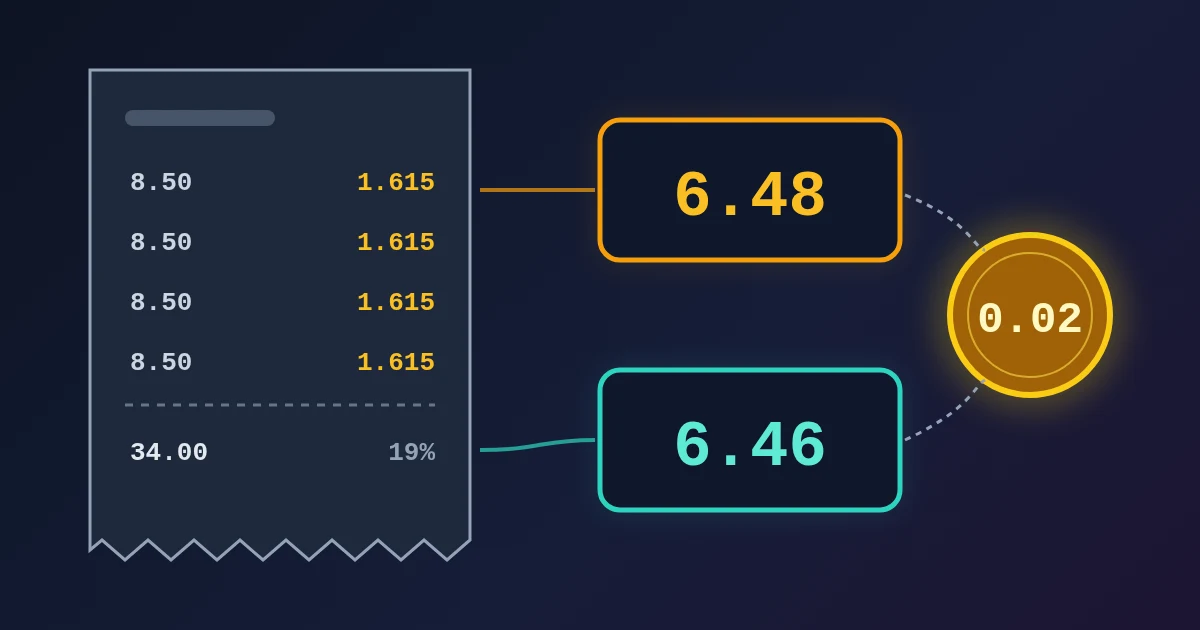
VAT totals differ by a cent or two because the VAT can be rounded at different points. You can round the VAT on each invoice line and add the rounded amounts, or add the net amounts first and work out the VAT once on the total. Four lines of 8.50 at 19% give 6.48 of VAT the first way (1.615 rounded to 1.62, four times) and 6.46 the second way (34.00 × 19%). Both methods are used in practice. The difference shows up when two systems, such as your shop and your accounting software or your invoice and your customer's records, use different methods. Floating-point math can add another cent, because 8.5 × 0.19 is stored as slightly less than 1.615.
Below are three worked cases, what the rules say in the UK, the EU and for e-invoices, and a checklist for anyone who builds or checks invoices.
Case 1: Round Each Line or Round the Total
An invoice has four lines of 8.50 net at 19% (Germany's standard rate):
| Method | Calculation | VAT | Gross total |
|---|---|---|---|
| Round each line (half up) | 1.615 → 1.62, × 4 lines | 6.48 | 40.48 |
| VAT on the total | 34.00 × 0.19 = 6.46 | 6.46 | 40.46 |
The exact VAT is 6.46. Rounding each line up by half a cent four times adds 0.02. With 100 such lines the gap would be 0.50. Rounding per line is not wrong, but the more lines you have, the further the total can drift from the exact figure.
Case 2: The UK Rules for Invoice Lines
HMRC's VAT Notice 700, paragraph 17.5 gives invoice traders these options when they work out VAT line by line. They can round each line's VAT down to the nearest 0.1p, or round it to the nearest 1p or 0.5p. Whatever they choose, they must do it consistently, and the final VAT total may be rounded down to a whole penny.
Take ten lines of £0.99 net at 20%. Each line has 19.8p of VAT:
| Method allowed in 17.5 | Per line | Total VAT |
|---|---|---|
| Round each line down to 0.1p | 19.8p | 198.0p → £1.98 |
| Round each line to the nearest 1p | 20p | £2.00 |
| VAT on the invoice total (£9.90 × 20%) | n/a | £1.98 |
Both line methods are allowed, and they differ by 2p on this invoice. HMRC's concession to round down is meant for invoice traders, where the customer pays the same VAT that the seller declares. Paragraph 17.6 says that a retailer who works out VAT at line or invoice level must not round the VAT down, but may round each calculation up or down.
Case 3: Prices That Already Include VAT
Shops usually set gross prices, so the VAT has to be taken out of the price with the VAT fraction. At 20% that is one sixth (Notice 700, paragraph 7.3.1). Ten items at £0.99 including VAT:
| Method | Calculation | VAT |
|---|---|---|
| Per item, nearest penny | 0.99 ÷ 6 = 0.165 → 0.17, × 10 | £1.70 |
| On the basket | 9.90 ÷ 6 = 1.65 | £1.65 |
The customer pays £9.90 either way. Only the split between the net price and VAT changes. Rounding each item up here overstates the VAT by 5p, and this gap is the kind of difference that reached the EU Court of Justice in the Wetherspoon case.
What the Rules Say
EU law has no single method. In J D Wetherspoon (C-302/07), the EU Court of Justice held that the VAT Directives contain no explicit rounding rule. Each member state sets the method, within the principles of fiscal neutrality and proportionality (paragraphs 30 to 37). A key point is that the VAT collected by the tax authority must not be more than the VAT on the invoice that the final customer paid (paragraph 34). Check your own country's rules, or ask your accountant.
UK. HMRC's rules are in Notice 700, paragraphs 17.5 and 17.6, summarised above. Most large retailers use a retail scheme instead.
E-invoices (EN 16931 and Peppol). Structured e-invoices state VAT per VAT category, not per line. Peppol BIS Billing 3.0 rule BR-CO-17 says: VAT category tax amount = VAT category taxable amount × (rate ÷ 100), rounded to two decimals. The taxable amount is the sum of the line net amounts in that category. An invoice system that rounds each line and adds the results can produce a category total that does not match this formula. A discussion in the CEN validation repository shows a real case of this. If you send e-invoices, calculating VAT per category from the summed net amounts is the method that matches the rule.
The Second Source of Error: Floating-Point Numbers
Even with a clear rounding rule, the code can round the wrong way. Most programming languages store decimals as binary floating-point numbers, so many cent values cannot be stored exactly.
8.5 * 0.19;              // 1.615 (printed), stored as slightly less
(8.5 * 0.19).toFixed(2); // "1.61", not "1.62"
Math.round(850 * 19 / 100) / 100; // 1.62, worked in whole cents
MDN's toFixed() page shows the same effect: (2.55).toFixed(1) returns "2.5", because the nearest double to 2.55 is slightly lower. Python's round() has the same issue (round(2.675, 2) gives 2.67), and it also rounds exact halves to the nearest even digit. For money in Python, use decimal.Decimal with an explicit rounding mode:
from decimal import Decimal, ROUND_HALF_UP
(Decimal("8.50") * Decimal("0.19")).quantize(Decimal("0.01"), ROUND_HALF_UP)  # Decimal('1.62')
Negative amounts need care too. In JavaScript, Math.round(-161.5) is -161, because halves round toward positive infinity. So a credit note can round differently from the invoice it reverses unless you round the absolute value and then put the sign back.
A Checklist for Invoice Totals
- Pick one method and write it down. Per line or per total, half up or down, and to which unit. Use the same method on every invoice and credit note.
- Keep unrounded amounts until the step where your rule says to round. Round once, at the point the rule names.
- Work in whole cents or a decimal type, never in raw floats.
- For e-invoices, calculate VAT per category from the summed net amounts, then show line amounts without VAT.
- Test the edge cases: amounts that land on exactly half a cent (such as 8.50 at 19% or 0.99 ÷ 6), negative amounts, and long invoices with many small lines.
- Reconcile with the other side. If your customer's books are a cent off, compare methods before you look for a bug.
For a quick check of one amount, the VAT Calculator splits a price into net, VAT and gross at any rate, and the VAT Calculator guide explains the formulas and VAT fractions. When an amount ends on exactly half a cent, round it with your own method from the list above. The Percentage Calculator covers discounts and markups, and the Invoice Generator builds a printable invoice.
Need help with a project? The team behind FindUtils takes on freelance work, such as a professionally developed MVP with all the core features you need.
FAQ
Should I round VAT per line or on the invoice total?
It depends on your country's rules and your software. HMRC allows per-line rounding as long as you are consistent. Peppol e-invoices calculate VAT per VAT category from the summed net amounts. Calculating on the total is closest to the exact VAT.
Why is the VAT on my invoice one cent different from my customer's calculation?
Usually one side rounds each line and the other rounds the total, or one side starts from gross prices and the other from net prices. Floating-point rounding in software can also move a half-cent amount down.
Can I always round VAT down?
Not always. In the UK, invoice traders may round the total VAT down to a whole penny, but retailers who work out VAT at line or invoice level must not round it down (Notice 700, paragraphs 17.5 and 17.6). Other countries set their own rules.
How do I avoid rounding errors in code?
Store amounts in whole cents or use a decimal type, round once with an explicit mode, and test half-cent and negative amounts.
Related Reading
Sources
- HMRC: VAT guide (VAT Notice 700), paragraphs 7.3.1 (VAT fractions), 17.5 (rounding on invoices) and 17.6 (retailers)
- CJEU, Case C-302/07, J D Wetherspoon plc v HMRC, judgment of 5 March 2009
- Peppol BIS Billing 3.0: rule BR-CO-17
- CenPC434 validation, issue 143: rounding on invoice lines and BR-CO-17
- MDN: Number.prototype.toFixed()
- Python documentation: round() and decimal module