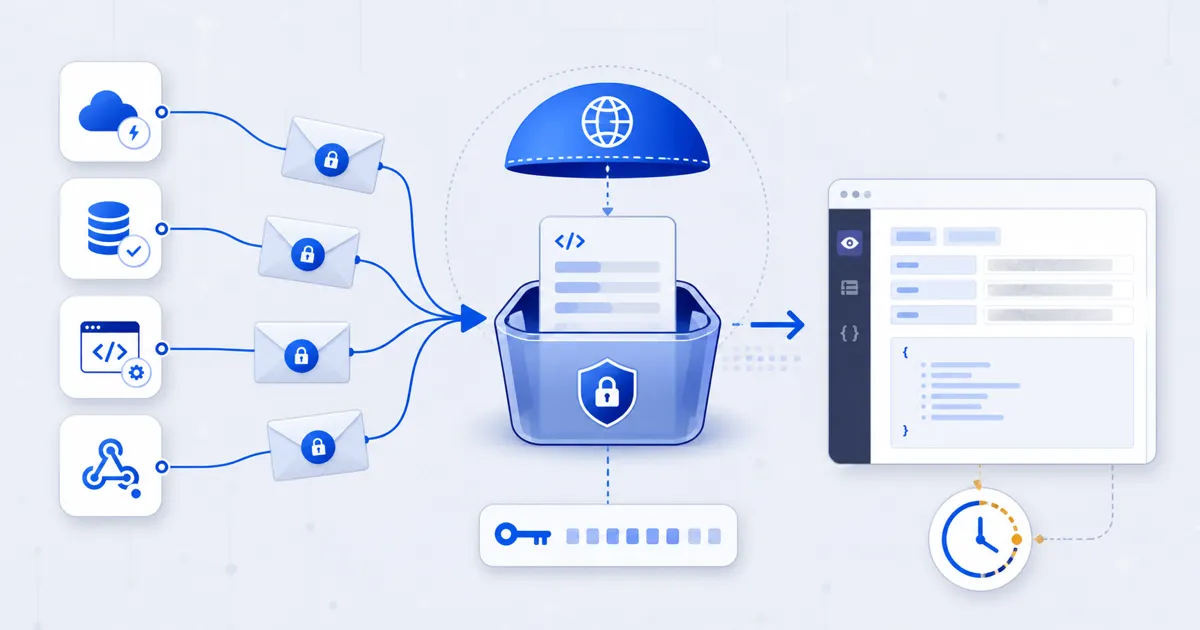
A webhook tester gives a sender a temporary public URL and shows the HTTP requests that arrive there. FindUtils Webhook Tester creates a request bin when its separate bin service is available. The service stores captured test requests until the bin expires.
Treat the bin identifier and receive URL as access secrets. Anyone with the identifier can inspect the stored request data. Use synthetic payloads, and never send passwords, production tokens, personal data, payment data, or live customer events.
Why Use a Webhook Request Bin?
A request bin shows the delivery that a provider actually sends. It is useful before your application endpoint is ready or when application logs hide part of the request.
- Endpoint setup: Confirm that a provider sends an event to the configured URL.
- Payload inspection: Review the method, path, content type, headers, and body text.
- Signature investigation: Compare the captured raw body and available signature header with the provider documentation.
- Retry review: Compare repeated deliveries and their receive times.
- Fast isolation: Separate sender configuration problems from application handler problems.
The bin is temporary storage, not a private vault or a production endpoint. It does not run your webhook handler, verify a signature, send a response from your application, or replay a capture.
How to Test a Webhook Online
Create one bin, send one controlled event, and inspect the result. Remove the temporary URL from the sender after the test.
Step 1Create a Temporary Bin
Open Webhook Tester and create a bin. Wait until the page shows a receive URL and an expiry time. The current service creates a 36-character hexadecimal identifier and keeps the bin for two hours.
Do not send a request if the page reports a service, network, or CORS error. A missing receive URL means that no valid test endpoint exists.
Step 2Protect the Receive URL
Copy the complete receive URL only into the test sender. Do not put it in a public issue, screenshot, source file, or long-lived document. Possession of the bin identifier provides access to the inspection data.
Use a synthetic event with obvious test values. Replace real email addresses, names, account identifiers, access tokens, and financial values before delivery.
Step 3Send One Controlled Request
Configure the provider to send a test event. If it has no test control, create a harmless sandbox event. You can also use HTTP Request Builder to prepare a request that matches the expected method, headers, and JSON body.
Send one request first. A small test makes method, path, header, and body differences easier to identify.
Step 4Select a Polling Interval
The page can poll the bin every 2, 5, or 10 seconds. The default is 5 seconds. You can also turn polling off and refresh when necessary.
Fast polling can help during a short interactive test. Slower polling reduces inspection requests when a provider has a delayed delivery. Polling changes how often the page checks the bin. It does not change how the sender delivers the webhook.
Step 5Inspect the Capture
Open the newest request and compare these fields with the provider documentation:
- HTTP method and path.
- Receive time and original body size.
- Content type and stored headers.
- Body text and the body-truncated indicator.
The service keeps the newest 50 requests in a bin. It records the original body size and stores up to 64 KiB of body text. It also limits stored header data to an 8 KiB budget. Older captures leave the list when newer requests exceed the bin limit.
Step 6Compare and Clean Up the Test Setup
Compare the capture with your expected contract. Check field names, event type, timestamp form, nesting, optional values, and signature input rules. Use Code Diff Checker for two text payloads when a small difference is hard to see.
Remove the receive URL from the provider after the test. The page does not expose a manual delete control. Automatic expiry removes the stored bin data after two hours.
Practical Webhook Testing Scenarios
Confirming Provider Configuration
Use the bin to verify that the sender has the correct endpoint and HTTP method. If nothing arrives, check whether the provider shows a delivery attempt, DNS error, timeout, or disabled event subscription.
Investigating a Signature Failure
Compare the stored body with the exact bytes your application verifies. Check the provider's signature header and timestamp rules. The bin redacts Authorization, Cookie, and header names that end with -token. It does not claim to find every secret header. Use test credentials only.
The tester does not verify the signature. Verification needs the provider algorithm, secret, timestamp tolerance, and constant-time comparison in your application.
Reviewing Retries and Duplicate Events
Trigger a controlled retry and compare request identifiers, event identifiers, receive times, and payloads. A request bin can show that duplicates exist. Your application must still implement idempotency.
Diagnosing Content-Type Problems
Check whether the sender uses JSON, form data, or plain text. A handler that expects JSON can fail when the provider sends a different content type, even when the body looks similar in a log.
Webhook Inspection Methods Compared
| Method | Best for | Main benefit | Main limit |
|---|---|---|---|
| Temporary request bin | Quick external delivery inspection | Needs no local public server | Data is temporarily stored and access uses the bin identifier |
| Local tunnel | Testing the real local handler | Exercises application code directly | Requires a running local service and tunnel controls |
| Application logs | Production handler diagnosis | Shows application decisions and errors | Can omit or transform request details |
| Provider delivery log | Sender-side status and retry review | Shows provider response records | May hide headers or body fields |
| HAR capture | Browser-originated HTTP analysis | Preserves a request timeline | Many server webhooks do not pass through a browser |
Use the request bin for short contract inspection. Use a sandbox endpoint or local tunnel when you must test handler logic and responses.
Common Mistakes
Mistake 1: Sending Production Data
The service stores captures until expiry. Use synthetic events only. Header redaction is a safety limit, not a complete data-loss prevention system.
Mistake 2: Sharing the Bin Identifier
The identifier grants inspection access. Keep the receive URL and inspection URL out of public records.
Mistake 3: Assuming a Missing Capture Means No Delivery
The bin service or page polling can fail. Check the displayed error and the provider delivery record before you reach a conclusion.
Mistake 4: Using the Bin as a Permanent Endpoint
Bins expire after two hours and keep a limited request list. They do not provide application processing or durable audit storage.
Mistake 5: Treating a Capture as a Passing Integration Test
A visible request proves delivery to the bin. It does not prove that your endpoint verifies, processes, stores, or acknowledges the event correctly.
Tools Used in This Workflow
- Webhook Tester creates and inspects the temporary bin.
- HTTP Request Builder prepares a controlled HTTP request.
- Code Diff Checker compares text payloads or header sets.
- HAR Viewer inspects browser network archives when the request starts in a browser.
- HAR to cURL converts a selected HAR request into a reproducible command.
FAQ
Q1: How long does a webhook bin remain available? A: The service sets the bin to expire two hours after creation. Stop using the receive URL before that time.
Q2: How many requests can one bin show? A: The bin keeps the newest 50 requests. New captures replace the oldest entries after that limit.
Q3: Does the tester store webhook data? A: Yes. The bin service temporarily stores request details and body text until expiry. Use synthetic data only.
Q4: What happens to a large request body? A: The service records the original size, stores the first 64 KiB of body text, and marks the capture as truncated.
Q5: Are sensitive headers removed?
A: The service redacts Authorization, Cookie, and names ending with -token. Other secret headers can remain, so use test credentials.
Q6: Can the tester verify webhook signatures? A: No. It helps you inspect the available body and headers. Your application must perform the provider-specific verification.
Q7: Can another person view my bin? A: A person with the bin identifier can inspect its captures. Treat the identifier and receive URL as access secrets.
Next Steps
Create a bin only when you have a synthetic event ready. Send one capture and compare it with the provider contract.
- Start with Webhook Tester.
- Read the HTTP Request Builder guide for controlled request setup.
- Read the HAR Viewer guide for browser request analysis.
- Build the expected request with HTTP Request Builder.