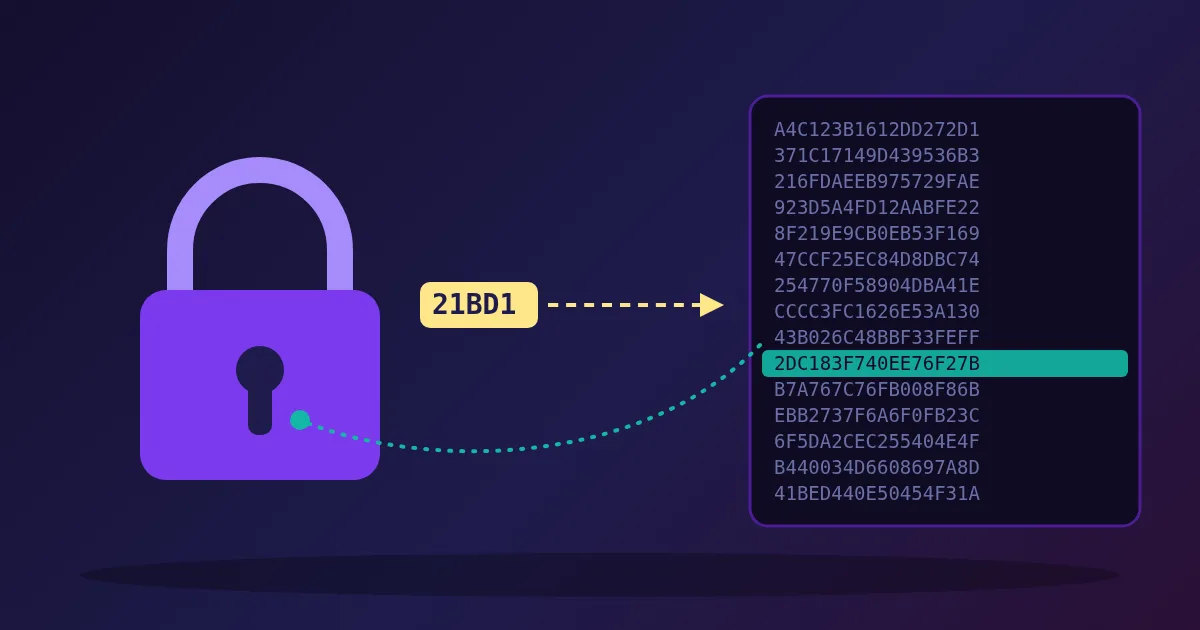
A good password breach checker never sees your password. Your browser turns the password into a SHA-1 hash, sends only the first 5 of its 40 hexadecimal characters to the Have I Been Pwned (HIBP) Pwned Passwords service, and gets back every leaked hash that starts with those 5 characters, about 2,000 of them. The browser then looks for your full hash in that list itself. The service learns only that you asked about one of roughly 2,000 hashes, not which one. This technique is called k-anonymity.
The FindUtils Password Breach Checker works this way on its page: the password is hashed in your browser, and only the 5-character prefix leaves it. Here is what happens at each step, using real numbers from the service checked on 22 October 2026.
The Problem: You Cannot Ask Directly
The simplest way to check a password against a breach list would be to send it to whoever holds the list. That defeats the purpose: you would be handing a possibly still-in-use password to a third party, over a network, to find out whether it is safe.
Sending a plain hash instead does not fix it. A SHA-1 hash of a common password is easy to reverse by looking it up in a table, and the breach list itself is a table of exactly those hashes. Whoever received your full hash could tell which password you checked whenever it was a known one.
The fix, first deployed for Pwned Passwords in February 2018 together with Cloudflare, is to send only part of the hash.
Step by Step: What Actually Gets Sent
Take the password P@ssw0rd.
| Step | Where it happens | Value |
|---|---|---|
| 1. Hash the password with SHA-1 | Your browser | 21BD12DC183F740EE76F27B78EB39C8AD972A757 |
| 2. Split it: first 5 characters | Your browser | Prefix 21BD1 |
| 3. Keep the other 35 private | Your browser | Suffix 2DC183F740EE76F27B78EB39C8AD972A757 |
| 4. Ask for the prefix | Sent to Pwned Passwords | GET /range/21BD1 |
| 5. Receive every leaked suffix with that prefix | Response | 1,925 lines, each SUFFIX:COUNT |
| 6. Look for your suffix in the list | Your browser | Found, count 6,421,042 |
The service only ever receives 21BD1. Every hash in its collection that starts with 21BD1 is equally likely to be the one you hold, so the prefix does not identify your password.
You can reproduce steps 1 to 3 yourself: the MD5 & SHA Hash Generator shows the SHA-1 of any text, and the first 5 characters are the prefix a breach checker would send.
Why 5 Characters Is the Right Size
A hexadecimal character has 16 possible values, so 5 characters give 16⁵ = 1,048,576 possible prefixes. HIBP's documentation says every one of them returns a result; there is no prefix with zero matches.
On 22 October 2026, 20 random prefixes returned between 1,889 and 2,102 suffixes each, about 1,970 on average. That works out to roughly two billion hashes in the collection, spread evenly because SHA-1 output is close to uniform. That count is the "k" in k-anonymity: your query hides among about 2,000 others in the same bucket.
The trade-off is deliberate. A 4-character prefix would hide you among about 32,000 hashes but make every response 16 times larger. A 6-character prefix would make responses tiny but leave only about 120 candidates. HIBP uses 6 characters for its email address version of the same idea, because the email collection is much larger, and 5 for passwords.
What the Number Means
The count next to a matching suffix is how many times that exact password appears across the breach data HIBP has loaded, not how many breaches or websites it came from. Counts we saw on 22 October 2026:
| Password | SHA-1 prefix | Times seen |
|---|---|---|
password | 5BAA6 | 52,372,427 |
qwerty123 | 5CEC1 | 13,871,714 |
iloveyou | EE8D8 | 7,007,935 |
P@ssw0rd | 21BD1 | 6,421,042 |
Tr0ub4dor&3 | 87457 | 3,196 |
correct horse battery staple | ABF7A | 391 |
The last two rows are the famous examples from the xkcd "Password Strength" comic. Both are now in breach lists, which shows the point of a breach check: a password can look strong to a strength meter and still be a bad choice because attackers already have it on their lists.
Any count above zero means the password has been exposed and attackers who try leaked passwords against other sites, known as credential stuffing, can use it. A count of zero means it is not in any breach HIBP has loaded yet. It does not mean the password is strong.
How to Check a Password on FindUtils
- Open the Password Breach Checker.
- Type the password into Enter Password to Check. The eye icon shows what you typed if you want to confirm it.
- Press Check Password or Enter. The check runs once, when you ask for it, not on every keystroke. HIBP itself recommends waiting until the whole password is entered rather than looking up each partial string.
- Read the result. Password Compromised! comes with the number of times the password appears in the data. Password Not Found in Breaches means no match in the current data.
The password is hashed exactly as typed, including spaces and capital letters, so Password and password are different checks.
What to Do With the Result
If it was found: stop using it everywhere you use it, starting with email and banking. Replace it with a new random password from the Password Generator, store it in a password manager, and turn on two-factor authentication. The 2FA Code Tester helps you confirm an authenticator app is producing the codes a site expects.
If it was not found: it is still worth running it through the Password Strength Checker. A short or predictable password can be guessed without ever appearing in a breach.
If you run a website: checking new passwords against a breach list is now standard guidance. NIST SP 800-63B says verifiers shall compare a new password against a blocklist that includes passwords from previous breaches, and should not force arbitrary periodic changes or composition rules. Many frameworks build this in; Laravel's password validation rule, for example, has an uncompromised() method that uses the same k-anonymity lookup.
Limits Worth Knowing
- It checks passwords, not accounts. To find out which services leaked your email address, search the address on haveibeenpwned.com. The two checks answer different questions.
- New leaks take time to appear. A password stolen last week may not be in the data yet.
- Use the page for real secrets. On the tool page, only the 5-character prefix leaves your browser. Do not paste a live password into tools or chats you do not trust.
FAQ
Is it safe to enter my password into a breach checker?
It is safe when the checker uses k-anonymity in your browser, as the FindUtils Password Breach Checker does on its page. Only the first 5 characters of the password's SHA-1 hash are sent, and about 2,000 leaked hashes share any given prefix, so the service cannot tell which password you checked.
What is k-anonymity?
k-anonymity is a privacy idea from Latanya Sweeney's 2002 research: a record is protected if it cannot be told apart from at least k−1 others. In breach checking, your hash prefix matches about 2,000 hashes, so your query is one of about 2,000 possibilities.
Why does the checker use SHA-1 if SHA-1 is broken?
SHA-1 is unsuitable for signatures because collisions can be manufactured, but that does not matter here. The hash is only used to look up a password in a list, and the k-anonymity step, not the hash, is what keeps your password private.
What does it mean if my password appears 391 times?
It means that exact password appears 391 times in the breach data. Even one appearance is enough to stop using it, because attackers try leaked passwords on other sites.
Does "not found" mean my password is strong?
No. It only means the password is not in the breach data loaded so far. Check its length and predictability with a strength checker as well.
How is this different from checking my email on Have I Been Pwned?
An email check tells you which services exposed your account. A password check tells you whether a particular password is in any breach, whoever used it.
Related Reading
- How to generate secure passwords
- How to test password strength online
- How to hash text data online
- How 2FA codes work: TOTP explained
Need help with a project? The team behind FindUtils takes on freelance work, such as a Laravel bug fix, version upgrade or new feature for your app.
Sources
- Have I Been Pwned: API v3, Pwned Passwords range search, padding and incremental searching
- Cloudflare Blog: Validating Leaked Passwords with k-Anonymity (21 February 2018)
- Troy Hunt: I've Just Launched Pwned Passwords Version 2
- Troy Hunt: Understanding Have I Been Pwned's Use of SHA-1 and k-Anonymity
- NIST SP 800-63B-4: Digital Identity Guidelines, Authentication and Authenticator Management
- Laravel documentation: Validation, password rule uncompromised()
- Latanya Sweeney: k-Anonymity: A Model for Protecting Privacy (2002)
- xkcd 936: Password Strength