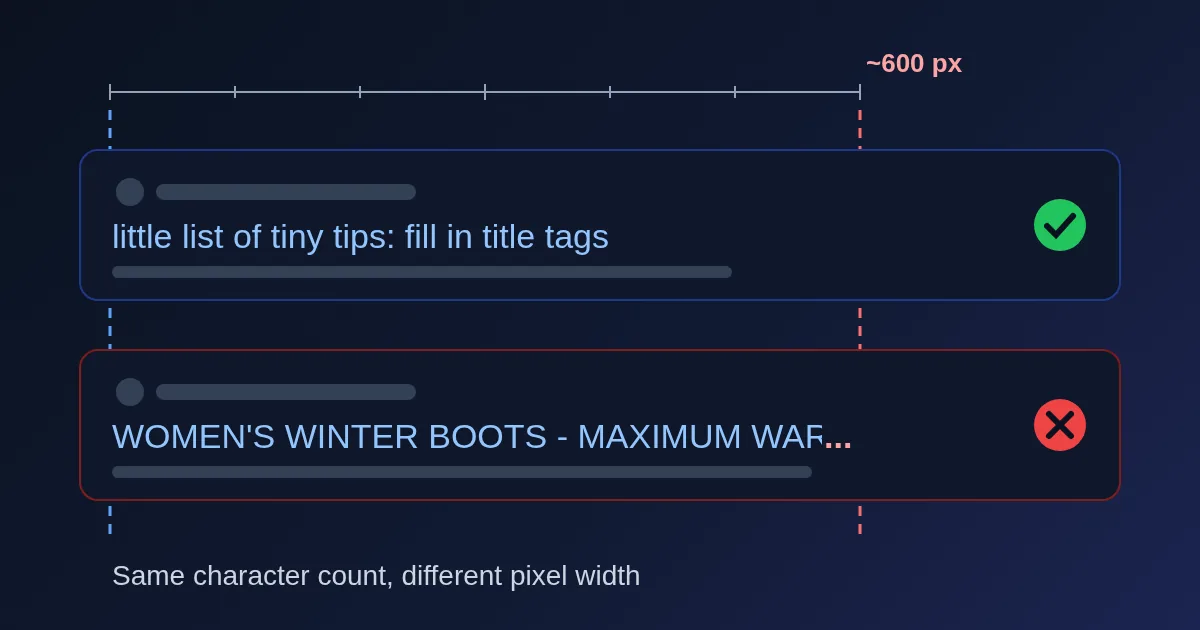
There is no fixed character limit for a title tag. Google's own documentation says there is no limit on how long a <title> element can be, but the title link "is truncated in Google Search results as needed, typically to fit the device width." The same sentence appears for meta descriptions. So the real budget is horizontal space, measured in pixels, and the familiar "50 to 60 characters" advice is only a stand-in for it. Independent studies put the desktop title width at about 600 pixels.
You can check any title and description against that width in the FindUtils SERP Preview, which shows a character count and a pixel estimate side by side.
Why Characters Are the Wrong Unit
Search result titles are set in a proportional font, where every letter has its own width. We measured the advance widths of a few characters in Liberation Sans, a font built to have the same character widths as Arial, at 20 px:
| Character | Width at 20 px |
|---|---|
i, l | 4.4 px |
space, t | 5.6 px |
a, e, o | 11.1 px |
m, M | 16.7 px |
W | 18.9 px |
A capital W is more than four times as wide as an i. The 26 lowercase letters average about 9.8 px, which is where the rule of thumb comes from: 600 px ÷ roughly 10 px per character ≈ 60 characters. That only holds for ordinary mixed-case text.
Here are four titles of almost the same length, measured the same way:
| Title | Characters | Width at 20 px |
|---|---|---|
| Little list of tiny tips: fill in title tags right, it is fine | 62 | 422 px |
| Running Pace Calculator - Pace, Time & Race Splits | FindUtils | 62 | 560 px |
| Women's Winter Boots - Maximum Warmth, Wide Widths | Megashop | 61 | 616 px |
| WOMEN'S WINTER BOOTS - MAXIMUM WARMTH, WIDE WIDTHS | MEGASHOP | 61 | 746 px |
The first two fit comfortably inside 600 px. The third is just over. The all-caps version is about 150 px over, so roughly the last dozen characters would be lost behind an ellipsis. Same character count, very different results.
Truncation Is Not the Same as Rewriting
Two different things can happen to your title in Google, and it helps to keep them apart:
- Truncation. Google shows your title but cuts the end to fit and adds "…". The fix is to make the title shorter in pixels.
- Rewriting. Google shows different text altogether, taken from your main heading, other prominent text, anchor text or other sources. Google lists nine sources it may draw on, including the
<title>element, the main visible title, headings,og:titleand links pointing to the page.
Google said in September 2021 that its title system uses the HTML title element "around 87% of the time". Independent measurements found more changes, partly because they count small edits:
| Study | Sample | Finding |
|---|---|---|
| Ahrefs (2021) | 953,276 pages in the top 10 | Title tag used 66.6% of the time; when Google rewrote it, it took the H1 in 50.76% of cases. Titles over 600 px were rewritten 46.12% of the time, up from 29.45% before the 2021 update |
| Zyppy (Q1 2022) | 80,959 titles from 2,370 sites | 61.6% changed at least slightly. Titles over 70 characters were rewritten 99.9% of the time, and 51 to 60 characters had the lowest rate, 39% to 42%. Titles with [square brackets] were rewritten 77.6% of the time |
Length matters for both problems. A long title gets truncated, and a very long one is also more likely to be replaced. Very short titles (1 to 5 characters, like "Home") were rewritten 96.6% of the time in the Zyppy data, usually by adding words.
Meta Descriptions Work the Same Way
Google's snippet documentation uses the same wording: "There's no limit on how long a meta description can be, but the snippet is truncated in Google Search results as needed, typically to fit the device width." Two more differences matter:
- Google often writes its own snippet. Snippets are "primarily created from the page content itself", and the meta description is used when it describes the page better. Snippets can change with the search query.
- You can cap the length. The
max-snippet:[number]robots meta tag sets a maximum snippet length, andnosnippetturns snippets off.
So a description is a strong suggestion, not a guarantee. Write it as a complete summary in the first 150 or so characters, so that whatever survives the cut still reads well.
How to Check a Title in the SERP Preview
The SERP Preview draws a Google-style result as you type.
- Enter the title, description and URL. The URL becomes a breadcrumb line, like
example.com > blog > title tags. You can also add a favicon URL. - Watch both counters. Under the title you see the characters and an estimated pixel width. The character count turns yellow above 60 and red above 70; for descriptions, above 155 and 160. The pixel count turns yellow at 90% of the limit and red past it. In Desktop view the title budget is 580 px and the description budget 920 px.
- Switch to Mobile. Mobile view uses its own budgets (920 px for the title at 18 px, 680 px for the description), so check both.
- Fetch a live page. Paste a URL and press Fetch to load that page's current title, description and favicon, a quick way to audit an existing page.
- Add competitors. Add up to five competing results to see your listing in a realistic list, where a cut-off title stands out.
- Copy the snippet HTML. Copy Snippet HTML gives you the
<title>,<meta name="description">and canonical link tags for your listing.
One honest note on the numbers. The pixel counter is an estimate built from average character widths, and it errs on the long side. The "Running Pace Calculator" title above measures 560 px in an Arial-width font, while the preview estimates 633 px and shows it truncated against its 580 px desktop limit. Treat a title that lands slightly over the line as borderline rather than broken; a title that is comfortably inside it is safe.
Practical Rules for Titles That Fit
- Put the words that matter first. If anything is cut, it is the end. "Running Pace Calculator - FindUtils" survives truncation better than "FindUtils - Free Online Running Pace Calculator for Runners".
- Keep the brand short and at the end, separated by a dash, colon or pipe, as Google's documentation suggests.
- Avoid all caps. Capitals are wide, as the boots example shows, and they read as shouting.
- Aim for roughly 50 to 60 characters and stay under about 600 px. Use characters as a quick check and pixels as the real test.
- Match the title to your main heading. Google may build the title link from the main visible title, so a page whose H1 and
<title>agree gives it one clear answer. The Heading Structure Analyzer shows your H1 at a glance. - Write a unique title for every page. Google calls out boilerplate titles as a reason to look elsewhere.
- Compare a few drafts. The SEO Title & Description Writer scores variants by length and pixel width; the Meta Tag Generator produces the full set of head tags once you have chosen one.
Social networks have their own rules for link previews, covered in Open Graph tags explained.
Need help with a project? The team behind FindUtils takes on freelance work, such as a pixel-perfect HTML page converted from your Figma or PSD design.
FAQ
How many characters should a title tag be?
Google sets no character limit; it truncates titles to fit the screen. About 50 to 60 characters of normal mixed-case text fits the roughly 600 px desktop width, and in a large 2022 study titles of 51 to 60 characters were the least likely to be rewritten. Check the pixel width, not just the count.
Why is my title cut off at fewer than 60 characters?
Because it is wide in pixels. Capital letters, W, M and m take far more space than i, l or t. A 61-character title in capitals measured 746 px in our test, well past the cut-off.
Does Google penalise long title tags?
Google's documentation says there is no length limit; long titles are truncated, not penalised. Very long titles are more likely to be rewritten, though: titles over 70 characters were changed 99.9% of the time in the Zyppy study.
How long should a meta description be?
There is no limit, but the snippet is truncated to fit the device. Put a complete summary in the first 150 or so characters. Google may still write its own snippet from your page content.
Why does Google show a different title than my title tag?
Google rewrites titles it considers empty, boilerplate, outdated, inaccurate or not matching the page's main heading. It may then use your H1, other prominent text or link text instead.
Is the SERP Preview free?
Yes. It is free, needs no account, and the preview runs in your browser.
Related Reading
Sources
- Google Search Central: Influencing your title links in search results
- Google Search Central: Control your snippets in search results
- Google Search Central Blog (September 17, 2021): More information on how Google generates titles for web page results
- Ahrefs: 6 Important Insights About Title Tags (953,276 Pages Studied)
- Zyppy: Google Rewrites 61% of Page Title Tags