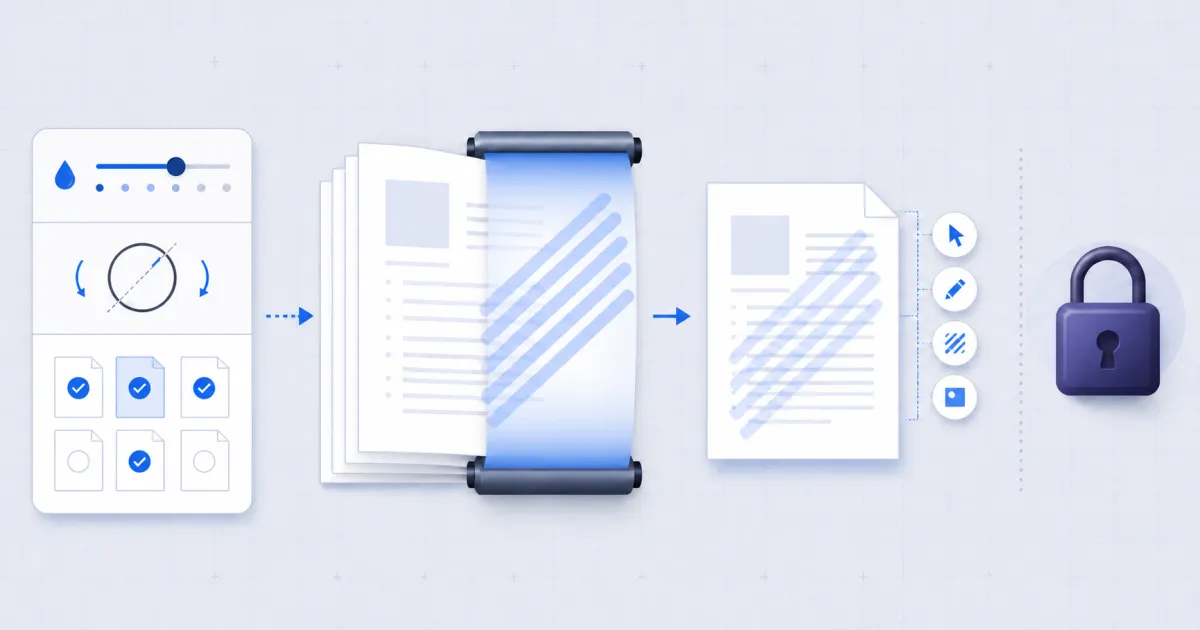
Add a watermark by drawing text over every page at low opacity. FindUtils PDF Watermark stamps CONFIDENTIAL, DRAFT or your own text across a PDF in your browser. The file is not uploaded.
This guide covers the settings that matter, and — more usefully — what a watermark does not do.
What a Watermark Actually Is
Text drawn on top of a page, at low opacity, usually rotated so it crosses the content. Nothing underneath is modified. That single fact explains both what it is good for and what it cannot do.
It is good at signalling. A reader who opens a page stamped DRAFT knows not to treat it as final. A page stamped CONFIDENTIAL carries its handling instruction wherever it is forwarded, printed or screenshotted. An email footer saying the same thing survives none of those.
It prevents nothing. The original content is untouched beneath the mark — that is the point of drawing over it — so the text stays selectable, the page stays intact, and anyone can remove the watermark with a tool very like this one.
Treat it as a label. Never as a lock.
How to Add a Watermark
Step 1Open the Tool
Go to PDF Watermark. Everything runs locally.
Step 2Drop the PDF
One file at a time. It is read in your browser.
Step 3Set the Text
Type it, or use one of the presets: CONFIDENTIAL, DRAFT, COPY, DO NOT COPY.
Step 4Tune Opacity, Angle and Colour
Defaults are 0.15 opacity, 45 degrees, mid grey. The next section explains why.
Step 5Choose Pages
Leave the field empty for the whole document, or name pages and ranges such as 1,3,5-8.
Step 6Apply and Download
The Settings, and Why the Defaults Are What They Are
| Setting | Default | Why |
|---|---|---|
| Opacity | 0.15 | Clearly visible, still light enough to read the page through. Higher marks become an obstacle; lower ones get missed. |
| Angle | 45° | A diagonal spans the page and is harder to crop away than a horizontal line across the top. |
| Size | automatic | The text is scaled to span the page's diagonal, so a mixed portrait-and-landscape document gets a mark that looks deliberate on both. |
| Colour | mid grey | Reads over both white space and black text without competing with either. |
Leaving size on automatic is the setting people most often override and most often should not. A fixed point size that looks right on A4 is wrong on a wide sheet, and a merged document usually has both.
Page Selection
Empty means every page. Otherwise the field takes 1-based numbers and ranges, the same syntax the other PDF tools use:
3— page three only1,3,5— three specific pages2-8— a range1,5-8,12— any combination
Marking only the pages that need it is common with a contract where an appendix is public and the body is not.
What It Will Not Do
- Protect the document. Covered above, and worth repeating because it is the single most common misunderstanding about watermarks.
- Use an image. This page draws text. For a logo or a signature graphic, PDF Editor has an image stamp.
- Remove a watermark. Keep your original. The stamped file is a new document and the original is untouched on your disk.
Common Mistakes
Mistake 1: Treating It as Security
If the content must not be read by the wrong person, a watermark is the wrong control entirely. Do not send the document.
Mistake 2: Opacity Too High
At 0.5 the mark competes with the text and the page becomes tiring to read. The document still has to be usable.
Mistake 3: Not Keeping the Original
The download is a new file. If you overwrite your source with it, the unmarked version is gone.
Mistake 4: Stamping Before Merging
Merge first, then stamp. Stamping each part separately gives inconsistent placement across a document assembled from different page sizes.
Choose Text That States the Document Status
Use short text that tells the reader what the mark means.
| Text | Use it for | It does not mean |
|---|---|---|
DRAFT | unfinished content | approved or final |
CONFIDENTIAL | a handling instruction | encrypted or access-controlled |
COPY | a duplicate document | an invalid document |
DO NOT COPY | a clear request | technical copy prevention |
| A recipient name | visible accountability | identity verification |
If access must stop after a date, use an access-control system. A fixed watermark cannot expire or revoke a downloaded file.
Tools Used in This Guide
- PDF Watermarkthis tool.
- PDF Editorannotations, signature, redaction, image stamps.
- PDF Page Numbersthe other common finishing step.
- PDF Mergermerge before you stamp.
FAQ
Is my PDF uploaded? No. It is read and rewritten in your browser.
Does a watermark protect my document? No. It is a visual label. Anyone can remove it.
Can I watermark only some pages?
Yes — page numbers and ranges, such as 1,3,5-8.
Will the text underneath stay selectable? Yes. Nothing beneath the mark is modified.
Can I use a logo image? Not on this page. PDF Editor has an image stamp.
Does it work on a scanned PDF? Yes. The mark is drawn over the scan the same way.
Next Steps
PDF Page Numbers usually follows, and PDF Compress if the document has to go by email.