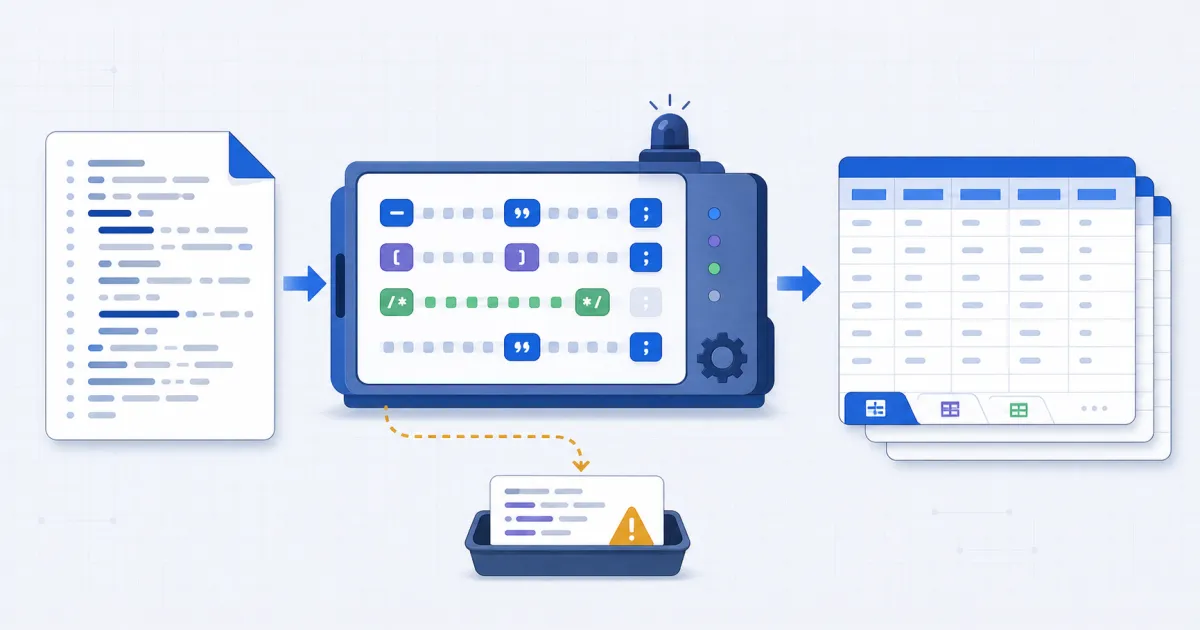
Convert SQL to CSV by reading the literal values out of each INSERT statement instead of running them. FindUtils SQL to CSV parses a dump as text in your browser and returns one CSV per table. It does not upload the file and it does not execute SQL.
This guide covers where the header row comes from, how NULL and escaped text are handled, which dump formats work, and which statements cannot be converted at all.
Why Convert SQL to CSV?
Someone sends you a database dump when what you needed was the rows. The standard route is long: install the right database client, create an empty database, import the dump, write a SELECT, then export the result. That is twenty to thirty minutes of setup for data you may only want to read once.
The shortcut exists because of what a dump actually is. It is a text file. The rows are already sitting in it as literal values inside INSERT statements. Getting them out needs a parser, not a database engine.
How to Convert SQL to CSV Online
Step 1Open the SQL to CSV Tool
Go to SQL to CSV. Everything runs locally, so the dump never leaves your browser.
Step 2Paste or Upload the Dump
Paste the statements into the left panel or upload a .sql file. Comments, SET, LOCK TABLES, index definitions and other dump noise are ignored automatically — there is no need to trim the file first.
Step 3Pick the Table
If the dump holds more than one table, a row of table names appears above the panels with the row count for each. Select one to preview it.
Step 4Check the Header Row
The header comes from the INSERT column list when there is one, then from a CREATE TABLE for the same table earlier in the file, then from positions as column_1, column_2 and so on. If the header reads as positional names, include the CREATE TABLE in your paste.
Step 5Review the Skipped List
Anything the parser could not read as literal rows is listed under the output with its line number. Read that list before you trust the row count.
Step 6Download
Download the selected table as CSV, or take every table at once as a zip.
What the Parser Actually Does
The file is walked one character at a time, tracking whether the position is inside a string literal, a quoted identifier, or a comment. That sounds like an implementation detail and it is the whole correctness story.
Two shortcuts look reasonable and both corrupt data silently:
- Stripping comments with a regular expression first. A value containing
--or/*is data. A regex pre-pass deletes the rest of that row. - Splitting statements on every semicolon. A value containing
;cuts the statement in two. You get fewer rows and no error.
Identifiers arrive in three styles depending on which database wrote the file: "double quotes" from PostgreSQL, `backticks` from MySQL, [brackets] from SQL Server. All three are unwrapped. A dotted reference such as public.users keeps only its last part, since the schema name means nothing once the rows are in a spreadsheet.
Type and Value Rules
| SQL in the dump | Cell in the CSV |
|---|---|
'plain text' | plain text |
'it''s' | it's |
'O\'Brien' (MySQL escape) | O'Brien |
'a,b' | "a,b" — quoted, one field |
NULL | empty cell |
TRUE / FALSE | true / false |
42, 1.5, 0x1A | written as-is |
NULL becoming an empty cell rather than the word null is the rule that matters most. Writing null turns a missing value into four characters of text that every later import treats as data.
Booleans are lower-cased so that a round trip works: run the CSV back through CSV to SQL and the column is recognised as a boolean again.
What Cannot Be Converted
Being honest about the limits is more useful than a longer feature list.
INSERT ... SELECTbuilds its rows from a query at run time. The values are not in the file, so no parser can produce them. These statements are listed by line number instead of being dropped silently.- Custom-format
pg_dumparchives (-Fc) are compressed binary, not text. COPY BINARYsections and binary blobs are not text either.mysqldump --tabwrites the rows to separate.txtfiles, so the.sqlfile holds only schema.
If your dump is one of these, convert it to plain SQL first: pg_restore -f dump.sql archive.dump turns a custom-format archive into text this page can read.
Common Mistakes
Mistake 1: Assuming an Empty Result Means an Empty Dump
If the output says no INSERT statements were found, the dump probably contains only schema. Check whether the rows live in a separate file.
Mistake 2: Ignoring the Skipped List
A dump can convert cleanly and still be missing a table, because that table was populated by an INSERT ... SELECT. The skipped list is the only place that shows up.
Mistake 3: Trusting Positional Column Names
column_1, column_2, column_3 means neither the INSERT nor a CREATE TABLE named the columns. The data is right and the header is a guess. Paste the CREATE TABLE and convert again.
Mistake 4: Converting a Dump You Should Not Open
Nothing is uploaded here, which removes one risk but not the other. A production dump full of customer records is still a production dump on your laptop.
Mistake 5: Expecting a Row Cap to Announce Itself Elsewhere
Conversion stops at 50,000 rows per table and says so above the output. Split a larger file rather than assuming the whole thing came through.
Check the CSV Before You Import It
Use this short check before another system reads the file:
- Compare the table name with the source statement.
- Confirm that the header uses real column names.
- Compare the displayed row count with the rows you expect.
- Read every item in the skipped list.
- Open the CSV in CSV Viewer and inspect text with commas, quotes and line breaks.
- Check whether an empty cell means SQL
NULLor an empty string in your next system.
The last check matters because CSV cannot store the difference. Both values can appear as an empty cell after export.
Tools Used in This Guide
- SQL to CSVread rows out of a dump.
- CSV to SQLthe reverse trip, back to INSERT statements.
- SQLite Browserfor a
.dbor.sqlitefile rather than a dump. - SQL Formatterpretty-print statements you want to read.
- CSV Viewercheck the grid before you import it anywhere.
FAQ
Do I need a database installed? No. Nothing is executed. The rows are literal values in the text.
Is my dump uploaded? No. Parsing happens in your browser and the file never leaves the tab.
Which dumps work?
Any whose rows are plain INSERT ... VALUES statements: mysqldump, a SQLite .dump, and pg_dump run with --inserts or --column-inserts. A default pg_dump writes rows as COPY blocks, which this tool does not read.
Why does one table have positional column names?
Because neither its INSERT statements nor a CREATE TABLE in the same file named the columns.
Can I get every table at once? Yes. Download all as .zip gives one CSV per table.
Does it handle MySQL backslash escapes? Yes, alongside the standard doubled quote. Handling only the standard form truncates mysqldump rows at their first apostrophe.
Next Steps
Once the CSV is out, CSV to Excel turns it into a spreadsheet file, and CSV to SQL takes it back to INSERT statements for a different database.