Merging subtitle files joins two or more caption files into one track. FindUtils Subtitle Merger does this for SRT and WebVTT files in your browser. The tool does not upload or store your caption files.
This guide explains the two modes, the timestamp problem that makes merging harder than pasting, and the one case where the default gets it wrong.
Why Pasting Two Files Together Does Not Work
Open two subtitle files in a text editor, put one after the other, and the result is broken. Both files start their cue numbering at 1 and both start their clock near 00:00:00. A player reading the joined file sees the second half's timestamps as belonging to the opening minutes, so the second part's captions appear during the first part's video and then nothing appears at all.
Part 1 ends:     00:45:12,300 --> 00:45:15,000
Part 2 begins:   00:00:01,500 --> 00:00:04,000   <- plays 45 minutes too early
Fixing it by hand means adding 45 minutes and change to every timestamp in the second file, then renumbering every cue in the merged file. For a two-hour lecture split in three that is several hundred edits, and one mistyped digit is hard to find afterwards.
Append: Parts of One Recording
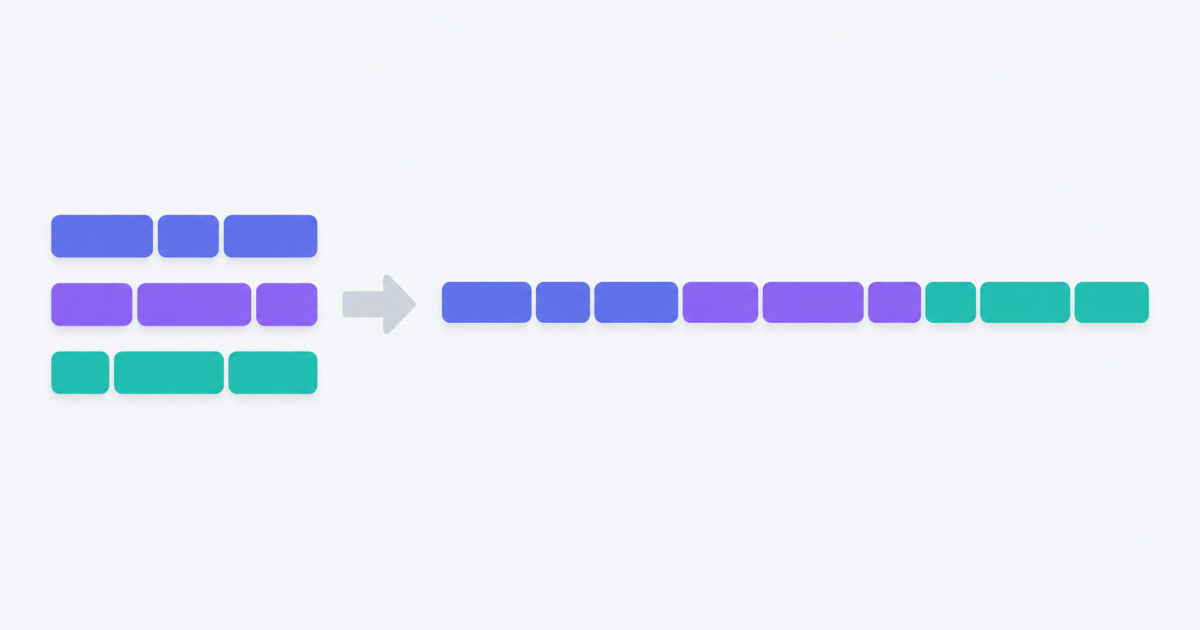
Append is the mode for sequential parts. It places each later file after the point the merged track has reached, then renumbers every cue from 1.
- Drop your files on the page. Two or more, and SRT and VTT can be mixed.
- Check the order in the list. Merging follows the list top to bottom, so part one must sit above part two. Each row has arrows to move it.
- Leave Append selected and set a gap if you want silence between parts.
- Download. The output keeps the format of the first file.
The offset is measured against each file's own first cue, not assumed to be zero. That matters more than it sounds: a part exported from an editor often starts at 00:00:01,500 rather than exactly zero, and some parts start well into their own timeline. Both land flush against the previous part either way, instead of leaving a silent hole the length of the second file's head.
The Gap
The gap is inserted between parts only, never before the first one, so the merged track still starts where part one starts. Zero is the right answer when the parts are contiguous chunks of one recording. A second or two is useful when the parts are genuinely separate segments and you want a visible break.
Dual: Two Languages on One Timeline
Dual mode is a different job. Instead of laying files end to end, it keeps one file's timing and attaches the overlapping lines from the other files to it, so both languages appear on screen together. This is how a bilingual subtitle track for language learning is built.
- Pick which file is primary. Its timings are the ones kept.
- Every cue from the other files is matched to the primary cue it overlaps in time, and its lines are added underneath.
- The output is one file with stacked lines, not two tracks.
Matching on overlap rather than exact timestamps is deliberate. A translation is rarely timed identically to the original — a translator splits one long line into two, or holds a line a beat longer — and requiring exact matches would drop most of them.
When Append Gets It Wrong
There is one case where the default is the wrong answer: parts that already share a timeline. If your files were cut from one long subtitle file without being renumbered, part two already starts at 00:45:12 rather than at zero. Append would move it a second time, pushing it 45 minutes further out and leaving a long silence.
The tell is easy to spot: open the second file and look at its first timestamp. If it is near zero, Append is right. If it is already deep into the video, turn on Keep original times. Every timestamp then stays exactly as written and the cues are ordered by start time instead.
What Happens to Cue Numbers
SubRip requires its cue numbers to be sequential, so the merged file is always renumbered from 1 regardless of what the inputs used. WebVTT identifiers are optional and the merged file fills them in the same order. This is why a merged file's numbering never has the duplicate 1, 2, 3, 1, 2, 3 that a copy-paste job produces.
Mixed Formats
SRT and VTT can go into the same merge. Each file is read in its own format, and the output is written in one — by default whichever the first file used. WebVTT cue settings, the positioning hints that follow the timing line, are carried through on the cues that had them.
When One File Is Broken
A file with a malformed timing line is reported by name with the line number, and the remaining files still merge as long as at least two of them could be read. This matters because a single typo in a 400-cue file would otherwise cost you the whole job, and the line number is the only thing that makes it fixable.
Which Tool Do You Actually Need?
Merging is one of four timing jobs, and picking the wrong one wastes an afternoon.
| Symptom | Tool |
|---|---|
| Several files, one video | Subtitle Merger — this one |
| One file, everything early or late by the same amount | Subtitle Shifter |
| One file, the gap grows as the video plays | Subtitle FPS Converter |
| Wrong file format for your player | SRT to VTT or ASS to SRT |
Limits
- Up to 20 files in one merge. Beyond that, merge in batches — a list that long is hard to keep in the right order anyway.
- Cue text is never translated, re-wrapped or edited. Only timestamps and cue numbers change.
- The tool does not burn subtitles into video. That re-encodes the picture and is a different job entirely.
- In Dual mode, a secondary cue that overlaps nothing in the primary file is not carried over. Swapping which file is primary usually fixes it.
Privacy
The files are read in your browser with the File API and the merge runs in the tab. Nothing is uploaded, nothing is stored, and closing the page is all the cleanup there is. You can confirm this by watching your browser's network tab while you merge — subtitle files are often under embargo or copyright, and there is no reason for them to leave your machine to be joined.